FAQ 2
I am using RM5762. Can I choose different camera views?
No. Only RM5762-2, the monitor with 2 Pan & Tilt cameras, has the monitoring mode.
RM5762-2 allows you to choose viewing your cameras in Single CAM, Patrol, or Split mode.
| Single CAM | The screen displays an image of a single camera unit on full screen. |
| Patrol | A single cam view that transitions to a different camera unit every 10 seconds. |
| Split | The screen displays both camera units. |
1. Press  when the parent unit is idle.
2. Press  ,
, ,
,  , or
, or  to choose Monitoring Mode, then press
  .
.
3. Press or to choose Single CAM, Patrol, or Split. Then, press .
- If you choose Single CAM, press or to choose the desired camera. Then, press .
 NOTE
NOTE
The parent unit is muted while in Split mode.
My camera view is half-blocked, or my camera view is too dark in the upper part of the image while the lower part of the image is over-exposed on the parent unit display. Why? - RM5762 / 5762-2
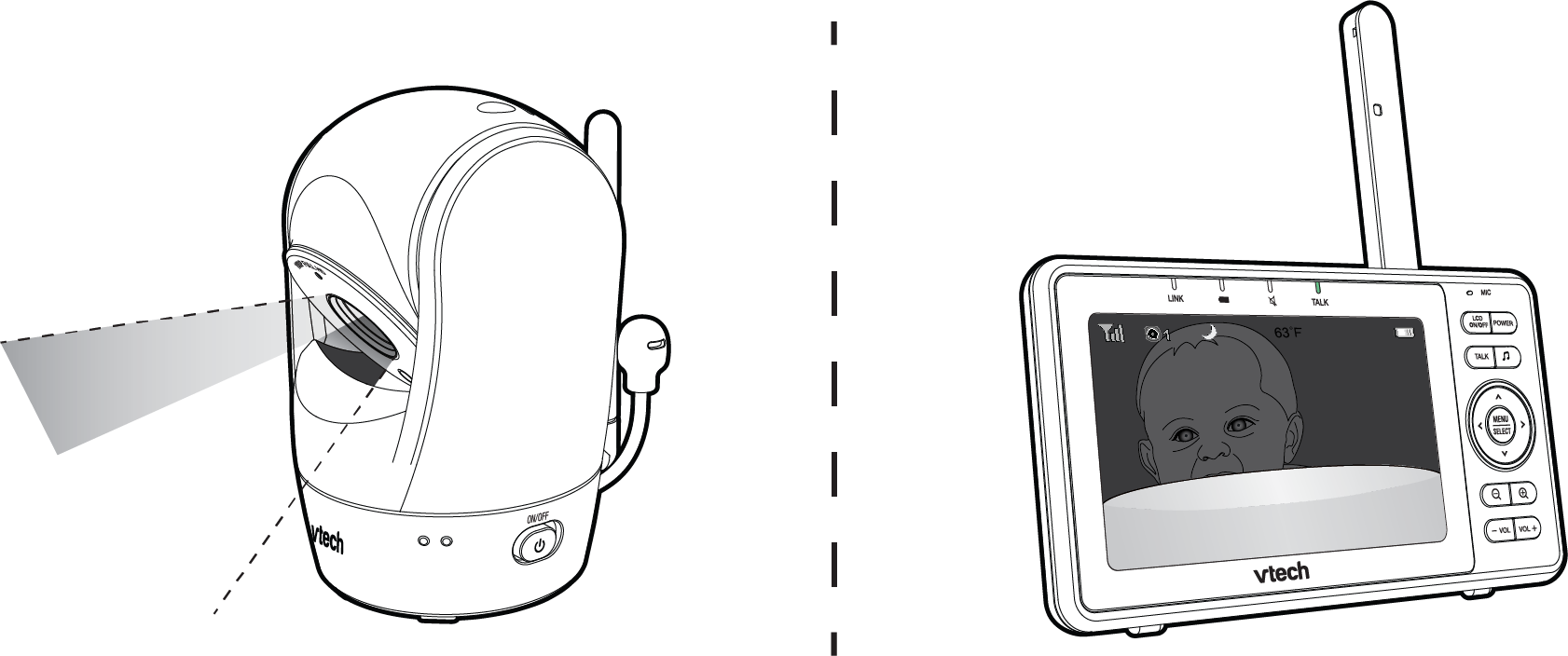
If you tilt the camera all the way down, the camera housing will block and affect the camera view and night vision. You may see the upper part of the image being very dark while the lower part being over-exposed on the parent unit display.
Where can I find the video/ event clips that were recorded with Motion Detection? - RM5752 / RM5762 Series
You can find the Motion Detection events in the Event log.
https://vtech.zendesk.com/